Defect Management
Finding a defect is only half the battle - if it's poorly reported, ignored, or lost, the testing effort is wasted. This topic covers the formal process of recording, tracking, and resolving anomalies found during testing.
~11 min read
The core ideas, explained
The Objectives of a Defect Report
When a tester spots a mismatch between expected and actual results, it's first logged as an incident - it may or may not turn out to be a genuine defect once investigated. A defect report is not just a complaint - it's a technical communication tool serving three objectives. For developers, it provides enough detailed, step-by-step information to reliably reproduce and fix the issue. For management, it provides metrics to assess software quality, track progress, and make release decisions. For process improvement, it provides data for root-cause analysis - like realizing the team keeps getting database bugs and needs better SQL training.
A single defect ticket lets a developer reproduce and fix a crash, lets a release manager decide "are there too many open critical bugs to launch Friday?", and later feeds a retrospective that spots a recurring pattern of database mistakes.
Severity vs. Priority
Understanding the difference between these two fields is the most critical concept in defect management. Severity is how badly the defect breaks the software - technical impact like a crash or data loss - evaluated by the tester. Priority is how urgently the business needs it fixed - business impact - evaluated by the Product Owner or Project Manager.
The application completely crashes (High Severity) if a user clicks "Submit" 50 times in 2 seconds on a legacy settings page that less than 1% of users visit. Because it's hard to trigger and affects few people, the business sets it to Low Priority.
The company's name is misspelled as "Macrosoft" in the giant header on the homepage. It doesn't break any functionality (Low Severity), but it's a massive PR embarrassment - the business sets it to High Priority, to be fixed immediately.
The Defect Lifecycle
The Defect Lifecycle describes the states a defect moves through from discovery to resolution. New is when the bug is reported. Open/In Progress is when a developer is actively working the fix. Fixed/Ready for Retest is when the code change is committed and deployed to the test environment. Closed is when the tester performs Confirmation Testing, verifies the bug is actually gone, and formally closes the ticket. Alternate paths: Rejected, when the developer determines it's not a bug (working as specified, or a duplicate), and Deferred, when it's valid but the business decides not to fix it this release.
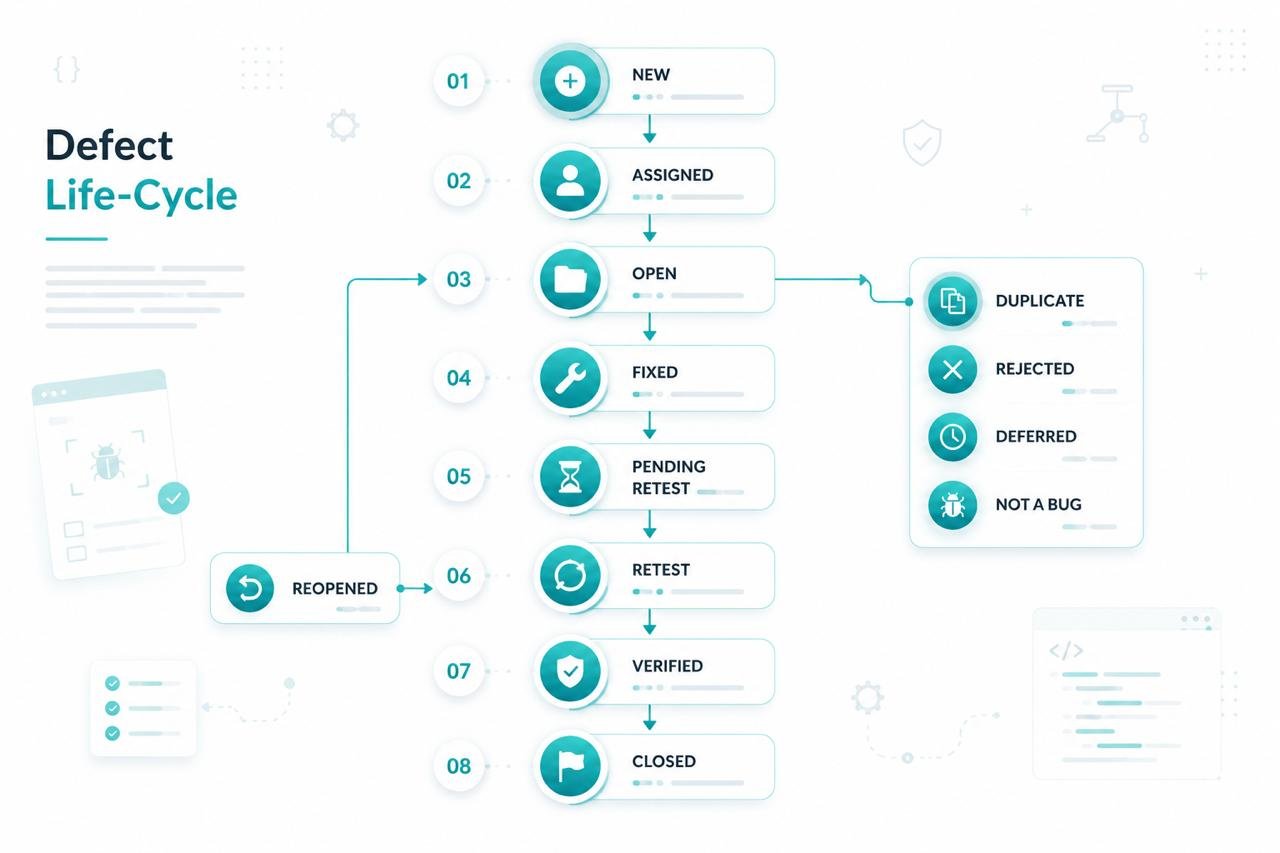
A tester logs a crash (New). A developer investigates and starts a fix (Open). The fix is deployed to staging (Fixed/Ready for Retest). The tester re-runs the original steps, confirms the crash no longer happens, and closes the ticket (Closed).
False Positives and False Negatives
Testing is not perfect - sometimes the defect reporting process itself is flawed. A False Positive (phantom bug) is when a tester reports a defect but there's no actual flaw in the software - often caused by a misconfigured environment, bad test data, or a misunderstood requirement, wasting developer time investigating a non-issue. A False Negative (missed bug) is when the software contains a defect but the test suite fails to detect it - often from poorly written test cases, insufficient coverage, or confirmation bias - letting the bug escape into production.
A tester reports a crash caused by their own expired database password, not a real code flaw - a False Positive, later rejected. Meanwhile, a real payment bug slips past a passing test suite and reaches production undetected - a False Negative.
Essential Fields in a Defect Report
To prevent developers from returning a bug with "Cannot Reproduce," a high-quality report must include a Unique ID and Title for tracking, Configuration Management Data (software version, OS, browser, test environment), Steps to Reproduce (numbered, exact actions), Expected vs. Actual Results, and Attachments like screenshots, recordings, or logs.
`BUG-402: Cart crashes on empty checkout`. Software version `App_v3.4.1`, `Staging_Server_B`, `iOS 17.1`. Steps: 1) Open cart with 0 items, 2) Tap checkout. Expected: system shows "Cart is empty" message. Actual: app crashes with a white screen. Attached: crash log and screen recording.
Key points to remember
- Severity = technical impact. Priority = business urgency. They are not the same thing.
- Testers close bugs, not developers - a developer marks it "Fixed" or "Ready for Retest"; only the tester who verifies the fix can mark it "Closed."
- False Positives waste time; False Negatives cause damage.
- A bug report is a professional document - it should be objective, clear, and devoid of emotion or blame.
Terminology
A few terms from this topic worth knowing precisely.
How badly a defect breaks the software - its technical impact, such as a crash or data loss - typically evaluated by the tester.
How urgently the business needs a defect fixed - its business impact - typically evaluated by the Product Owner or Project Manager, independent of technical severity.
The states a defect passes through from discovery to resolution - New, Open/In Progress, Fixed/Ready for Retest, and Closed - with Rejected and Deferred as alternate paths.
A reported defect where there is actually no flaw in the software - often caused by a misconfigured environment, bad test data, or a misunderstood requirement.
A real defect that exists in the software but that the test suite failed to detect, letting it escape into production.
A mismatch between expected and actual results logged during test execution - it may or may not turn out to be a genuine, confirmed defect once investigated.
Summary
Defect Management is the systematic process of tracking anomalies from discovery to closure. A high-quality defect report equips developers with the steps and environment data needed to reproduce the issue, and clearly contrasts the Expected Result with the Actual Result. By distinguishing between Severity (technical impact) and Priority (business urgency), teams can triage effectively. The formal Defect Lifecycle ensures no bug is lost, requiring testers to perform confirmation testing before any issue is officially marked as Closed.
| Concept | One-line memory hook |
|---|---|
| Defect Report | Expected Result vs. Actual Result + Steps to Reproduce |
| Severity | How badly is the software broken? (Technical) |
| Priority | How fast do we need to fix it? (Business) |
| Defect Lifecycle | New → In Progress → Ready for Retest → Closed |
| Deferred | It's a real bug, but we'll fix it next year |
| False Positive | Crying wolf - reporting a bug that was just a bad test environment |
Check your understanding
20 questions, easy to hard - click an option to see if you got it right.